

a. It can be charged using the USB cable, connecting it to the computer while the computer is turned on.
a. Copying them in the MP3/MP4 player’s main directory, together with the folders that appear by default. b. It is important to make sure that you only try to copy files that are the right format for the model.
a. Using the converter programmes that come with every MP3/MP4 player.
a. Copying them from the camera unit to the folder you want on your computer.
a. Connecting the unit to your computer. b. Once the MP3/MP4 player is detected as a removable disk drive, selecting it and right-clicking, then selecting the “Format” option. c. In the “File System” option, select FAT32.
a. Any standard SD or MMC card, up to 1 GB.
To install Amazon appstore in the tablet you need to follow this video:
The guide is also available for download in this link
You can print it so it’s easier for you to follow the steps.
To register in Amazon appstore in the tablet you need to follow this video:
The guide is also available for download in this link
You can print it so it’s easier for you to follow the steps.
To enable Amazon appstore parental control in the tablet you need to follow this video: The guide is also available for download in this link You can print it so it’s easier for you to follow the steps.
Once you open the built in browser, tap  enter into parent control interface: |
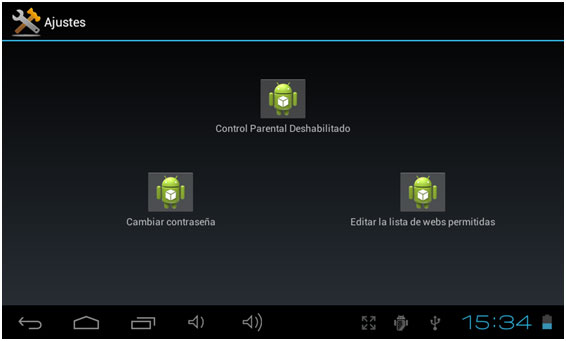 |
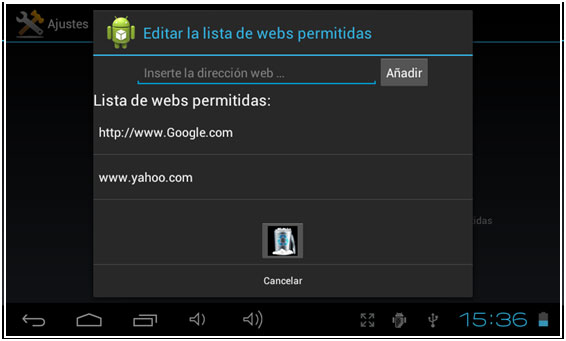
|
The only way to disable parental control is with the password or resetting the tablet (Restoring factory default settings, then the default password will be 1234)
The lock screen security is used to protect your tablet data in case of theft or loss. In case you have entered an incorrect pattern or password the device will lock. In order to use the tablet again contact our customer service.
It is not necessary to install Google Play in our tablet. The amazon appstore already comes pre-installed in order to download thousands of apps. You only need to install it in the tablet and register as an amazon user.
The tablet supports up to 32Gb micro SD memory cards
Currently Ingo doesn’t have this type of case in our catalogue. But we are developing this accessory so you can protect better your device.
The tablet has 2 USB ports. One is a standard port that allows connecting USB pendrives to reproduce music or videos and to connect 3G dongles. The other port is a mini USB port and it’s used to connect the Tablet to the computer so you can transfer your data.
The USB port admits plugging a 3G USB Dongle to connect to the internet using a cellular data plan. Plug the 3G Dongle to the tablet; in a few seconds it will require you to insert the PIN code of your modem’s SIM card (Your mobile carrier should have given it to you together with the SIM card). Once inserted the PIN code you can surf the internet using your data plan.
HEU003D tablet uses Android 2.3 and it can’t be upgraded to Android 4.0 as it’s not compatible.
The tablet models MHU001D, MMU002D and HEU004D have all the same specifications:
The tablet volume is limited to 85dBm this is according to the newest European Union safety standards to protect children ears. To ensure the maximum volume you must ensure that it’s placed at its maximum level pressing the + key that you have in the top corner of the tablet. Also we recommend you to have the speaker uncovered, since if we leave the tablet in a desk the speaker will be covered and it will sound low.
In some units we have detected an error when you select “Zoom to fill screen” in the screen main settings. In order to solve the issue we must press the icon of the screen settings (Placed in the low right corner of the screen with 4 diagonal arrows) and select the first option “Stretch to fill screen” and press Accept in the error message that it appeared. Once this option is selected the tablet will work perfectly.
Check the tablet’s power level, charge it with the adaptor for 2 hours and check again.. Or connect your tablet with your computer via USB cable to see if it can be powered on.
Check if volume is set to ‘0’. Or earphone may be broken, please change another one
Check if there is dust in the earphone or speaker. Check if the file is broken
Reset your tablet. You can use a pin to stab the reset hole to restart your tablet
To correct it, you may go to Settings > Accessibility > Touch panel calibration to calibrate it; In case calibration can’t be carried out, you may press the power button for about 15 seconds to force the tablet to shut down. Calibration will be automatically done as soon as you start up your tablet again. Use a USB mouse to carry out calibration operations on your tablet.
Not all Android apps are compatible with all Android devices. If you have downloaded the app try to download it again and reinstall it.
If an account is added, the account is shown in “Accounts & sync” of “Settings”, where you may also add another account. To delete an undesired account, go to “Settings” > “Privacy settings” > “Factory data reset”. Your tablet’s internal storage, installed apps, etc. will also be deleted, except pre-installed apps and the data in your flash memory. Be careful before you carry out this operation


 icon